How to Maintain Industrial Inkjet Printers in 2026

Time:2026-11-24 Author:Ethan
0%

Industrial inkjet printers keep production lines moving, but small maintenance lapses can quickly become costly. A partially blocked nozzle may leave pale streaks across cartons; dried ink can turn a short pause into a lengthy restart. Deloitte has estimated that unplanned downtime costs industrial manufacturers about $50 billion annually. That figure covers manufacturing broadly, not inkjet printers alone, but it shows why dependable upkeep matters.

So, how to maintain industrial inkjet printers in 2026? Start with the equipment maker’s service instructions, then build a routine around the printer’s ink, operating environment, and shift pattern. Smithers’ report, The Future of Inkjet Printing to 2027, tracks inkjet’s expanding use across print applications. As installations grow, consistent cleaning, inspection, and recordkeeping become practical safeguards—not optional chores. Check printheads and nozzles for residue, confirm ink and solvent levels, inspect filters and cables, and document recurring faults. Small checks count.

Quality-management expert W. Edwards Deming wrote, “Quality comes not from inspection but from improvement of the production process.” His point fits printer care: checking output alone cannot prevent failures; repeatable daily habits can. Still, no checklist is perfect. A schedule that works in a clean packaging room may fail near dust, heat, or frequent washdowns. Review maintenance records, adjust intervals when evidence supports it, and ask trained technicians to investigate persistent defects. This guide explains the essential checks, service intervals, and troubleshooting steps for keeping industrial inkjet printers reliable in 2026.
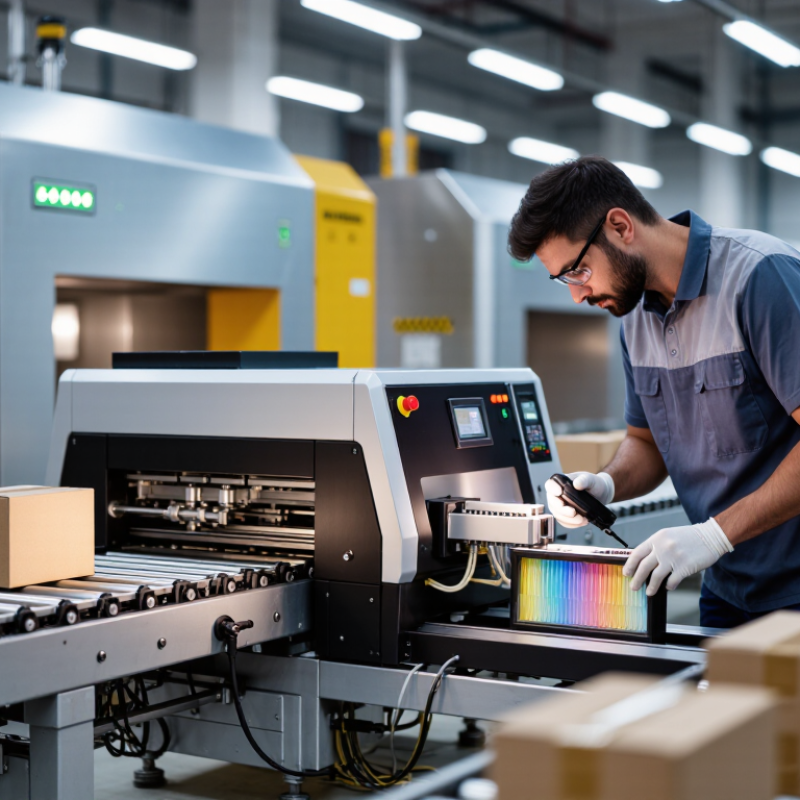
How to Maintain Industrial Inkjet Printers in 2026

Understanding Industrial Inkjet Printer Components and Operating Conditions

Industrial inkjet printers depend on several parts working together: the printhead, ink reservoir, filters, pump, sensors, and conveyor encoder. Each has a different job, so a fault that looks like a printhead problem may begin elsewhere. For example, a clogged filter can restrict ink flow and create faint or uneven characters. Check the ink lines for leaks, bubbles, or dried residue, especially near fittings. Small changes matter.

Operating conditions affect these components every day. Dust can collect around the printhead, while heat may alter ink behavior or speed evaporation. High humidity can also affect some inks and substrates. Keep the printer within the temperature and humidity range specified in its operating manual. Make sure airflow is not blocked, and avoid placing the unit where vibration shifts the printhead-to-product gap. Even a small change in distance can soften an otherwise sharp mark.

A practical inspection should match the machine’s actual workload. Check nozzle performance, clean only with approved materials, and record changes in print quality, alarms, and ambient conditions. A log can reveal patterns that a single inspection misses. It is easy to blame the ink first, though a loose connector or dirty sensor may be the real cause. I would not assume one routine suits every installation; confirm service intervals and cleaning steps in the equipment documentation.

Establishing a Daily Inspection and Cleaning Routine

A daily inspection should take only a few minutes, but it needs a consistent order. Check ink and solvent levels before the shift, then look for leaks, dried residue, or unusual noise around the printhead. Inspect the nozzle plate and gutter under good light. Use a lint-free swab and the cleaning fluid specified for the equipment; touching the nozzle opening can create new problems. Small clues matter. Print a test sample on the actual production material. Look for missing dots, blurred edges, or a changing character height. Record the result, fluid levels, and any alarms in a simple log. A quick note beats a guess later.

The U.S. Department of Energy’s Operations & Maintenance Best Practices guide reports 8–12% lower costs for predictive maintenance than for preventive maintenance. It also reports 30–40% lower costs than reactive maintenance. These are broad industry estimates, not printer-specific guarantees. Still, they support catching small faults before a line stops. Clean exterior surfaces and check cables each day, but follow the printer’s service instructions for internal parts. A routine can become careless, too. If every check is marked “normal,” review whether operators are actually inspecting the same surfaces and recording real observations.

Maintaining Ink Systems, Printheads, and Fluid Lines

Industrial inkjet maintenance starts with the ink system. Check the reservoir level, cap, and filter for residue or discoloration. Use only the ink and cleaning fluid specified for the printer; incompatible fluids can alter viscosity or damage seals. Before opening a system, follow the equipment manual’s shutdown and pressure-release steps. Wear suitable protective equipment, and keep lint-free wipes nearby.

Inspect printheads when the machine is safely stopped. Dried ink around the nozzle plate can disrupt a clean pattern, while rough wiping may cause damage. Use the approved cleaning method and avoid touching the nozzle surface. Run a test print after cleaning, then compare fine lines and small characters with a known-good sample. Small changes matter. A pale stripe may point to a clogged nozzle, but it can also signal an ink-delivery problem.

Fluid lines deserve a close look. Check fittings for dampness, tubing for kinks, and connections for air bubbles. Replace worn tubing with the correct material and size, rather than forcing a near match. Record the date, observed symptoms, and parts changed. It is easy to skip that note during a busy shift; later, it may be hard to tell whether a recurring fault followed a cleaning or a component change. Keep service records with the printer, and inspect the line path under normal operating conditions.

Checking Calibration, Software, and Environmental Controls

How to Maintain Industrial Inkjet Printers in 2026
Checking Calibration, Software, and Environmental Controls

Calibration should be routine, not a rescue step. Run a nozzle check and alignment chart at the start of each shift, then compare results with the printer’s approved reference. If fine lines look doubled or color patches drift, clean the affected head and recalibrate before changing production files. Keep dated charts beside the machine; a tidy log can still hide a missed check. Back up print profiles and record software or firmware changes, so operators can trace sudden shifts in drop placement or color.

Control the room, too. ISO 12647-2:2013 specifies 23 ± 1°C and 50% ± 5% relative humidity as reference conditions for process control in offset printing; these are not universal inkjet setpoints. Use the printer’s operating limits, and log temperature and humidity near the machine, not across the room. Small shifts matter. Dust on a sensor, a warm draft near the printhead, or a door left open can affect repeatability. ASTM D4332-14(2022) uses 23 ± 2°C and 50% ± 5% humidity for conditioning packaging materials before testing, a useful reminder that substrates also respond to their environment. Inspect media for curl or moisture changes before blaming calibration. Some days, the cause is not obvious. Keep investigating.

How to Maintain Industrial Inkjet Printers in 2026: Calibration, Software, and Environmental Controls

These illustrative planning estimates show the time for common routine checks: print calibration, software and job settings, ink and fluid levels, printhead condition, and ambient conditions. Actual times and schedules vary by printer, ink, production demands, and manufacturer guidance.

Diagnosing Wear and Scheduling Preventive Maintenance

Wear often appears in the print before a machine alarms. Look closely. Fine horizontal gaps, weak edges, or repeated banding can point to partial nozzle blockage, unstable pressure, or a worn component. Compare a test pattern with a clean baseline under the same settings. A phone photo beside a ruler can make small changes easier to track.

Inspect the nozzle plate for dried residue, then clean it only by the approved procedure. Check filters, seals, and ink lines for buildup, flattening, or tiny leaks. Listen for a pump that cycles more often than usual, and note changes in print quality after startup. Record the drift. One symptom rarely proves one cause, so avoid replacing parts based on guesswork.

Set maintenance intervals around operating hours, print volume, ink type, and shop conditions. A dusty room or long daily shifts may call for more frequent checks than a calendar alone suggests. Use a daily visual check, a weekly review of test patterns, and scheduled inspections for filters and moving parts. Log dates, findings, cleaning, and repeat faults. No schedule is perfect. Review it when failures cluster, and adjust intervals using service guidance and actual machine history. A missed entry can distort the trend; it happens, so make the log quick enough to maintain.

FAQS

Which parts should operators inspect on an industrial inkjet printer?

Check the printhead, ink reservoir, filters, pump, sensors, and conveyor encoder. Each part can affect print quality.

What can cause faint or uneven characters?

A clogged filter may restrict ink flow. Check for bubbles, leaks, or dried residue near fittings. Small clues matter.

What environmental conditions can affect printing?

Dust, heat, humidity, and vibration can change print results. Keep airflow clear and follow the manual’s temperature and humidity range.

What should a daily inspection include?

Check fluid levels, leaks, unusual noise, the nozzle plate, and gutter. Print a sample on the actual production material.

How should operators clean a printhead?

Stop the machine safely and use approved cleaning fluid with a lint-free swab. Avoid touching the nozzle surface. Gentle is better.

How can operators tell whether cleaning helped?

Compare a test print with a known-good sample. Look for missing dots, blurred edges, pale stripes, or changes in character height.

What should operators look for in fluid lines?

Check fittings for dampness, tubing for kinks, and connections for air bubbles. Replace worn tubing with the correct size and material.

Why keep a maintenance log?

Record print changes, alarms, fluid levels, conditions, and replaced parts. A brief note can reveal patterns later. A tidy log is not enough; observations must be real.

Should every printer follow the same maintenance schedule?

No. Match inspections to the machine’s workload and documentation. I might assume one routine fits all, but that would be a mistake.

Conclusion

Learning how to maintain industrial inkjet printers begins with understanding their key components and the conditions in which they operate. A consistent daily routine helps catch problems early: inspect the printer for leaks, residue, loose connections, or unusual sounds, and clean accessible surfaces according to safe operating procedures. Give particular attention to the ink supply, printheads, and fluid lines, since contamination, buildup, or restricted flow can affect print quality and reliability.

Regularly check calibration, software settings, and environmental conditions such as temperature and humidity to keep printing consistent. Watch for signs of wear, including faded output, misalignment, recurring alerts, or changes in ink consumption. Record inspections and maintenance tasks, then use those records to plan preventive service before small issues cause unexpected downtime. Following a clear schedule helps extend equipment life, maintain dependable results, and support efficient production.

Ethan

Ethan

Ethan is a seasoned marketing professional with a deep expertise in our company's innovative product line. With a passion for sharing knowledge and insights, he takes the lead in regularly updating our corporate blog, where he explores industry trends, product features, and effective marketing......