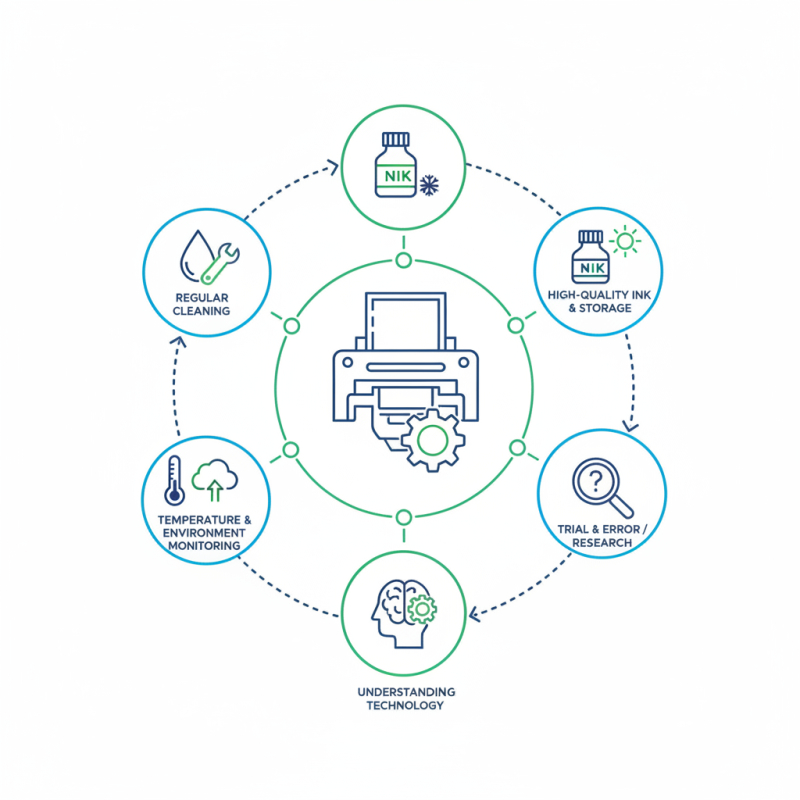
When exploring how to improve printhead performance, understanding the intricacies of print technology is essential. Print quality relies heavily on the printhead's efficiency and maintenance. A well-functioning printhead translates to sharper images and cleaner text. However, many users encounter issues with clogged nozzles or inconsistent ink flow.
To address these problems, consider regular cleaning and following the manufacturer’s guidelines. The choice of ink can also impact performance significantly. High-quality ink and proper storage conditions can prevent degradation. Additionally, monitoring printhead temperature and environment helps maintain optimal functioning.
It's crucial to acknowledge that improving printhead performance is often a trial-and-error process. Not every technique works for every printer model. Thus, staying informed about advancements in print technology can guide users in making better decisions. By investing time in understanding these aspects, one can significantly enhance the overall printing experience.
Printhead performance is critical for achieving high-quality prints. It directly impacts color accuracy and detail in every print job. According to industry reports, around 30% of print quality issues stem from inadequate printhead maintenance. Understanding this significance helps users appreciate the need for regular upkeep.
Tips for enhancing printhead performance include periodic cleaning and using appropriate inks. Keeping your printhead clean can reduce clogging and maintain optimal flow. Insights suggest that using the right ink formulation can improve adherence and vibrant color output. Shift to automated cleaning routines if possible, as they offer convenience and consistent results.
Another key aspect is recognizing when to replace printheads. A degraded printhead can lead to inconsistent colors and poor resolution. Investment in high-quality replacement parts may seem costly but ultimately enhances productivity. Experimenting with settings, like print speed and resolution, can also yield better outcomes. Tracking performance changes is advisable to make informed adjustments.
Printhead efficiency plays a vital role in achieving high-quality prints. Several factors can significantly affect printhead performance, impacting the clarity of images and text. One of the most common issues is clogs caused by dried ink. According to a report by TechNavio, cleaning mechanisms can boost overall printing efficiency by up to 25%. Regular maintenance, including periodic cleaning, ensures that printheads operate effectively.
Another factor influencing printhead quality is temperature. A study from the International Society for Printing Research indicates that optimal printing temperatures can enhance droplet formation and adhesion. If the printhead overheats or is too cool, it may produce inconsistent results. Keeping your printer in a temperate environment can lead to more reliable outcomes.
Tips: Ensure proper ink storage away from sunlight to prevent drying. Also, regularly run printer diagnostics to identify potential issues early. This proactive approach can reveal hidden inefficiencies that may otherwise compromise print quality. Take note of the ink levels as well; low ink can cause streaks and uneven colors. Making adjustments based on these insights is crucial for maintaining printhead functionality and achieving better printing results.
Maintaining printhead performance is crucial for achieving high-quality prints. Regular maintenance can significantly enhance the longevity and functionality of your printer. For starters, keeping your printer clean is essential. Dust and debris can clog the printhead, resulting in poor quality prints. Use a soft, lint-free cloth to wipe the exterior and an air duster to eliminate dust particles around the printhead area.
Another key factor is the ink quality. Using subpar ink can lead to printhead issues. It is essential to use inks that are compatible with your printer and have appropriate viscosity. This can prevent clogs and ensure smooth ink flow. Additionally, performing routine printhead cleaning cycles can help remove buildup. However, overusing this feature can cause waste, so be sure to strike a balance.
Lastly, be mindful of your printing habits. Frequently printing lower quality documents can lead to unnecessary wear. It might be a good practice to alternate between high and low-quality settings based on your needs. Reflect on your usage and consider keeping a print log. This will help track performance issues and identify patterns that require attention. By adopting these tips, you can actively improve printhead functionality and overall printing results.
| Maintenance Tip | Frequency | Expected Benefit | Estimated Time |
|---|---|---|---|
| Clean Printhead Nozzle | Every Week | Prevents Clogs | 10 minutes |
| Use Quality Ink | Always | Improves Print Quality | N/A |
| Run Printer Regularly | Every Few Days | Keeps Nozzles Lubricated | 5-10 minutes |
| Keep Printer in a Dust-Free Area | Always | Reduces Contamination | N/A |
| Replace Printhead as Needed | As Needed | Restores Print Quality | 30 minutes |
Optimizing printhead settings is crucial for achieving high-quality print results. A recent industry report indicated that nearly 75% of print quality issues stem from inadequate printhead performance. Fine-tuning these settings can yield more vibrant colors and sharper images. For instance, adjusting the nozzle size can influence ink flow and droplet size, which directly impacts resolution.
Different print jobs require distinct settings. For high-resolution graphics, a finer nozzle and lower speed can enhance detail. Conversely, for bulk printing tasks, using larger droplets and faster speeds can improve efficiency. A study showed that businesses can save up to 30% on printing costs by optimizing their printhead configurations for specific tasks. Setting cleaning schedules is also vital. Regular maintenance prevents clogs, maintaining peak performance.
However, achieving the perfect balance can be challenging. Each machine has unique characteristics that affect how settings interact. Experimentation is often needed. Misjudging these settings can lead to ink wastage and time loss. Thus, the optimization process requires ongoing attention and adjustments. Analyzing print results holds key insights for continuous improvement. Adaptability and vigilance are essential for mastering printhead performance.
Upgrading printhead technology can significantly enhance printing outcomes. According to a recent report, incorporating advanced printhead systems can reduce ink consumption by up to 30%. This not only lowers operational costs but also improves environmental sustainability. Enhanced precision in droplet size leads to sharper images and vibrant colors.
When considering a printhead upgrade, focus on compatibility and resolution capabilities. Many systems now offer resolutions beyond 1200 dpi, allowing for finer details. The challenge is ensuring that your existing hardware can support these improvements. It’s crucial to balance cost versus performance. Investing in high-quality printheads could result in improved client satisfaction and retention.
Here are some tips to optimize your printhead performance:
: Printhead performance affects color accuracy and detail in prints, influencing overall print quality.
About 30% of print quality issues come from poor printhead maintenance and lack of cleaning.
Clean the printhead regularly and use suitable inks to prevent clogging and improve flow.
Consider replacement if you notice inconsistent colors or poor resolution in your prints.
Yes, adjusting settings like nozzle size can enhance color vibrancy and image sharpness significantly.
Use a finer nozzle and lower speed for high-resolution jobs; larger droplets and faster speeds for bulk tasks.
Set a regular cleaning schedule; this helps maintain performance and prevents buildup.
No, balancing settings can be tricky. Experimentation is often necessary for the best results.
Monitor performance changes and analyze print results to make informed adjustments over time.
Poor attention can lead to ink waste, decreased productivity, and overall print quality decline.
Improving printhead performance is crucial for achieving high-quality printing results. Understanding the importance of printhead efficiency involves recognizing how a well-functioning printhead impacts overall print quality and operational effectiveness. Common factors that affect performance include environmental conditions, ink type, and maintenance practices. Regular maintenance, such as cleaning nozzles and ensuring proper ink flow, can significantly enhance the longevity and functionality of printheads.
To optimize printhead performance, it's essential to adjust settings tailored to specific print jobs, which can lead to better color accuracy and resolution. Additionally, upgrading to advanced printhead technology can provide superior printing outcomes, allowing for more vibrant colors and sharper images. By following these guidelines on how to improve printhead performance, users can ensure more reliable and efficient printing operations.
Vector Print